
Equipment to get started with music production
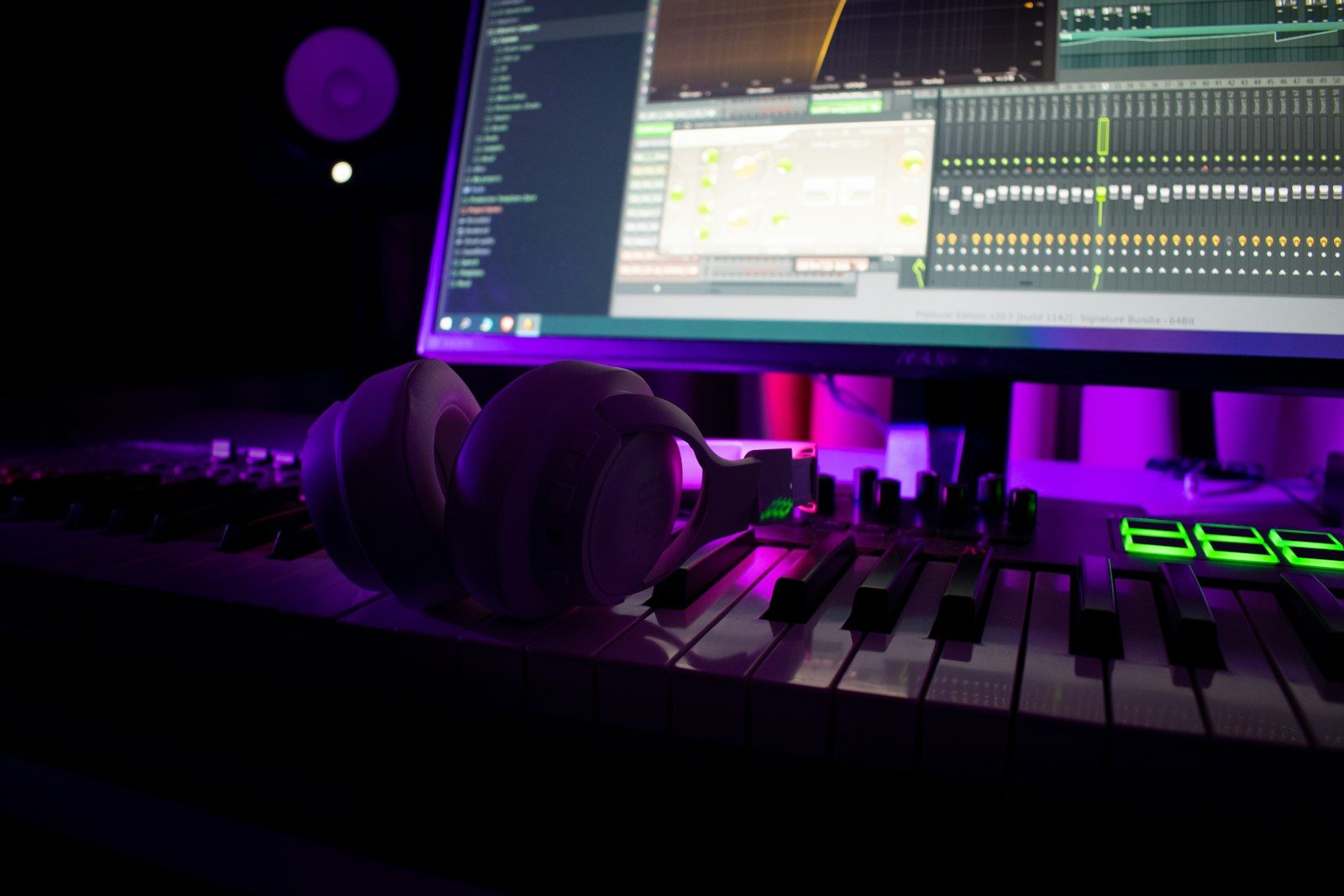
Photo: Dima Zimakov / Unsplash.
A common question when you want to produce music is: what equipment do I need to buy to get started?
You probably need less than you think. A studio full of equipment can be useful, but it cannot replace practice, careful listening, and knowing the tools you already have.
Here is a balanced starting setup, with an explanation of what each piece does.
1. A suitable computer
The computer is the center of a digital studio. It runs your digital audio workstation (DAW), records and edits audio, hosts virtual instruments, and organizes your projects.
You do not need to start with the most expensive computer. Before replacing your machine, try the one you already own. For your first projects, the priorities are:
- enough storage for projects and audio libraries;
- enough memory to run your DAW and a few plugins;
- a port compatible with your audio interface;
- a stable system that can record without interruptions.
If your current computer runs your DAW reliably, it can be your starting point.
2. An audio interface
An audio interface connects microphones and instruments to your computer. It also converts the project's digital audio into a signal for headphones or speakers.
If you are recording one or two sources at a time, a two-input interface is usually enough. The Focusrite Scarlett 2i2 is a familiar example, but other manufacturers offer good alternatives.
Pay attention to:
- the number and type of inputs;
- 48 V phantom power for condenser microphones;
- a headphone output with a volume control;
- outputs for studio monitors;
- compatibility with your computer and DAW.
Do not choose solely by the number of connections. Think about what you actually need to record simultaneously.
3. A microphone
If you want to record vocals, acoustic instruments, or amplifiers, you will need a microphone.
The two common choices for a first setup are:
- Dynamic: often a practical choice for vocals, amplifiers, and live performances. Many models have lower sensitivity, which can be useful in some home environments.
- Condenser: often captures more detail and transients, but calls for closer attention to the room and microphone placement.
The amount of room sound in a recording depends on more than the microphone type. Polar pattern, distance from the source, placement, and gain all affect the result.
A condenser microphone is not automatically better. In a noisy or echoey room, a good dynamic microphone may give you a more controlled recording.
Budget for an XLR cable and a stand. A pop filter is also useful for vocals.
4. Headphones or studio monitors
You need to hear what you are recording and the choices you are making.
Headphones
Headphones are the simplest option in an untreated room or when you need to work without disturbing other people.
For vocal recording, choose closed-back headphones to reduce playback leaking into the microphone. For editing and mixing, comfort and familiarity with their sound matter a great deal.
Studio monitors
Monitors can offer a more natural sense of space and balance, but speaker placement and room acoustics strongly affect what you hear.
If your budget is tight, start with good headphones. Monitors cannot fix a problematic room on their own.
5. A MIDI keyboard controller, if it fits your work
A MIDI controller does not produce audio on its own. It sends information to control virtual instruments in your DAW.
It is particularly useful for:
- recording chords and melodies;
- playing virtual pianos, synthesizers, and organs;
- programming drums and bass;
- controlling instrument and plugin parameters.
If you mainly record vocals or guitar, or edit audio, a controller can wait. For keyboard players, composers, and arrangers, it can make the creative process much faster.
6. Small items that make a difference
Some accessories seem secondary, but your setup needs them to work:
- suitable XLR and 1/4-inch (6.35 mm) cables;
- a microphone stand;
- a pop filter for vocals;
- reliable adapters;
- a power strip or surge protection;
- monitor stands, when needed;
- external storage or backups for your projects.
Before buying cables and adapters, check the connections on each device. Draw the signal path first.
The signal path
In a simple setup, audio follows this path:
Microphone or instrument → audio interface → computer and DAW → headphones or monitors
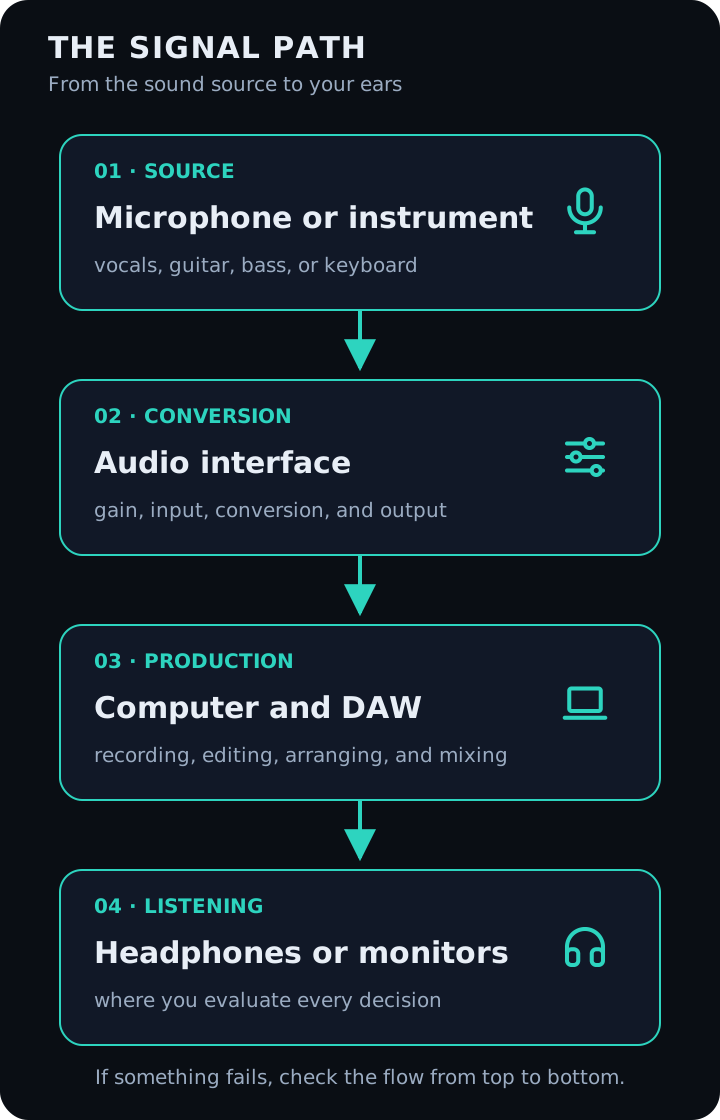
Understanding this flow makes it easier to configure inputs, outputs, gain, and monitoring. It also helps you find the problem when something is not working.
Three ways to start
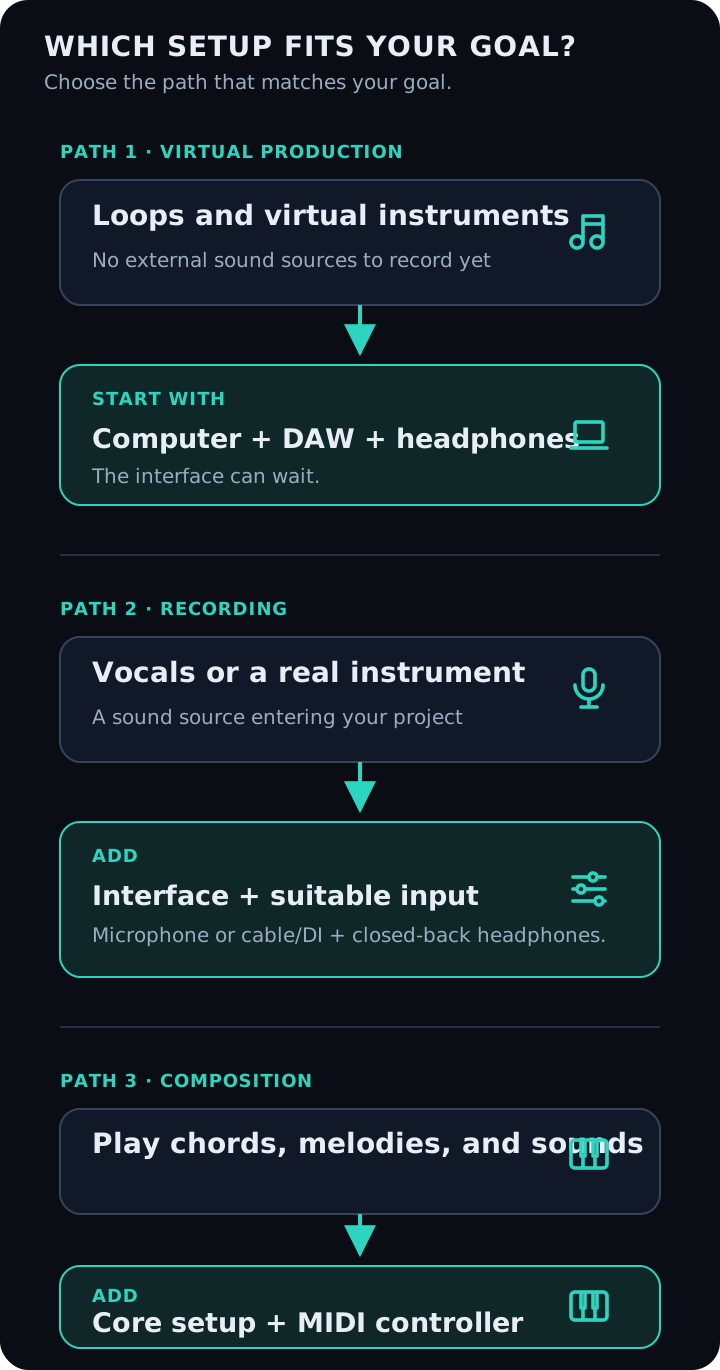
A minimal setup for learning production
- computer;
- DAW;
- headphones.
With those tools, you can edit audio, use loops, program virtual instruments, and study arrangement and mixing.
A setup for recording vocals or instruments
- computer;
- DAW;
- two-input audio interface;
- microphone suited to the room;
- cable, stand, and pop filter;
- closed-back headphones.
A setup for composition and arrangement
- computer;
- DAW;
- headphones or monitors;
- MIDI keyboard controller;
- audio interface, if you also record external sources.
What I would avoid buying at the beginning
It is easy to spend heavily before understanding your needs. I would avoid starting with:
- many plugins that do similar things;
- an interface with inputs you will never use;
- expensive monitors without suitable placement in your room;
- several microphones before learning to use one well;
- equipment chosen only because another producer uses it.
Your DAW's built-in tools are enough to learn many of the fundamentals.
Example budgets
The prices below were recorded on August 29, 2026. They are historical reference points, not live quotes. Promotions, shipping, availability, and payment methods can substantially change the total. For purchases in U.S. dollars, also account for exchange rates, Brazil's IOF tax where applicable, and other local taxes. Check the final price before buying.
These are not affiliate links. The examples use Brazilian retailers and Brazilian reais (R$); dollar amounts are in U.S. dollars (US$).
Computer reference prices
- Dell DC15, Core i5, 8 GB RAM, and 512 GB SSD: around R$ 3,600–4,300. An entry-level option for smaller projects; I would consider upgrading to 16 GB RAM when possible.
- 13-inch MacBook Air with M5, 16 GB RAM, and 512 GB SSD: approximately R$ 12,600–14,000, depending on the retailer and promotion.
- 14-inch MacBook Pro with M5 Pro, 24 GB RAM, and 2 TB SSD: a professional configuration in the R$ 30,000–39,000 range. This is far more than most beginners need.
Audio-interface reference prices
- Teyun Q24: approximately R$ 220–450. The least expensive option here, but research drivers, support, and reliability before buying.
- M-Audio M-Track Duo: approximately R$ 750–800. It has two combo inputs, phantom power, direct monitoring, and includes MPC Beats with instruments and effects. It is a budget option from an established manufacturer, with a maximum sample rate of 48 kHz.
- Third-generation Focusrite Scarlett Solo: around R$ 1,600–1,800. Suitable for someone recording one vocal or instrument at a time.
- Fourth-generation Focusrite Scarlett 2i2: approximately R$ 2,000–2,200. Two inputs make it a balanced choice for a personal studio.
- Fourth-generation Focusrite Scarlett 2i2 Studio kit: around R$ 3,000–3,300. The kit includes an interface, condenser microphone, closed-back headphones, and an XLR cable, reducing the number of separate purchases.
- PreSonus Quantum ES 2: US$ 199.99 on the international store at the time of comparison. It has two inputs, preamps with 75 dB of gain, Auto Gain, and a perpetual license for the manufacturer's DAW.
- PreSonus Studio 24c: US$ 157.99 on the manufacturer's international store at the time of comparison. It has two inputs, MIDI, level meters, and recording up to 24-bit/192 kHz. See the Mercado Livre listing too, where the price in reais may differ.
At the time of this comparison, the DAW previously known as Studio One Pro had become Fender Studio Pro, retaining Studio One's core and session compatibility.
The Quantum ES 2 offer included a perpetual Fender Studio Pro license. The Studio 24c had historically included Studio One Artist; the offer checked for this article included a six-month Fender Studio Pro trial. Older stock may have different bundles, so confirm the included license with the seller.
Software reference prices
- REAPER: a fully functional 60-day evaluation. The discounted license was US$ 60 for personal, educational, nonprofit, or commercial use with annual revenue up to US$ 20,000. The commercial license was US$ 225.
- Logic Pro: a one-time Mac purchase for R$ 1,299.90.
- Apple Creator Studio: includes Logic Pro, MainStage, Final Cut Pro, Pixelmator Pro, and other apps. Reference prices were R$ 39.90/month or R$ 399/year, with an education plan at R$ 14.90/month or R$ 149/year for eligible users.
- Ableton Live 12: US$ 99 for Intro, US$ 349 for Standard, and US$ 749 for Suite. Suite also offered 24 rent-to-own payments of US$ 31.21 and a 30-day free trial. Live is particularly useful for clip-based creation, electronic music, improvisation, and live performance.
- ACE Studio: an optional tool for AI-generated vocals and instruments. Promotional annual plans started at the equivalent of US$ 16.58/month when checked. Billing is in dollars, and prices may change after a promotion.
- Suno Studio: a browser-based AI music-production environment with a multitrack timeline, MIDI, instruments, effects, automation, text-based plugin creation, stem separation, and export to other DAWs. At the time of comparison, Studio required the Premier plan, listed at the equivalent of US$ 24/month with annual billing. Check Suno's commercial-use terms and applicable copyright rules before distributing a project.
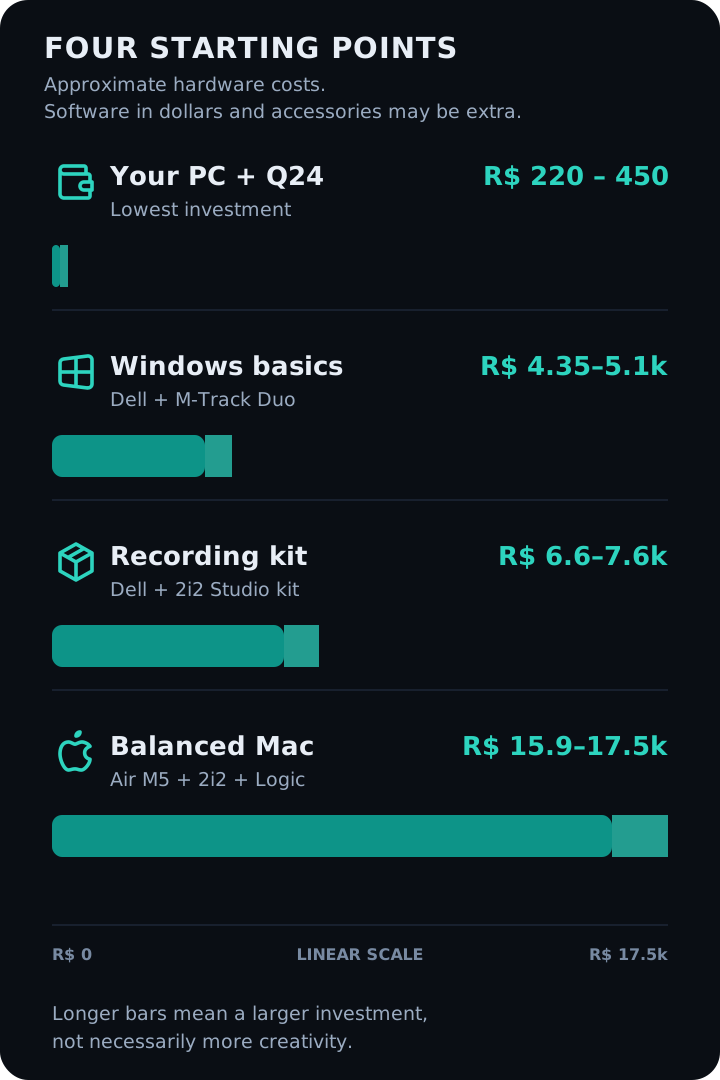
Budget 1: use the computer you already own
- your current computer;
- Teyun Q24: R$ 220–450;
- REAPER: US$ 60, after the evaluation period;
- headphones and a microphone you already own or will choose separately.
Hardware subtotal: approximately R$ 220–450.
This requires the least investment, but the budget interface calls for more research into compatibility and support.
Budget 2: an essential Windows setup
- Dell DC15: R$ 3,600–4,300;
- M-Audio M-Track Duo: R$ 750–800;
- REAPER: US$ 60;
- microphone, headphones, cable, and stand purchased separately.
Computer and interface subtotal: approximately R$ 4,350–5,100.
Budget 3: a complete recording setup
- Dell DC15: R$ 3,600–4,300;
- Scarlett 2i2 Studio kit: R$ 3,000–3,300;
- REAPER: US$ 60.
Hardware subtotal: approximately R$ 6,600–7,600.
This is the most complete option for someone who does not yet own an interface, microphone, or headphones.
Budget 4: a balanced Mac setup
- MacBook Air M5: R$ 12,600–14,000;
- Scarlett 2i2: R$ 2,000–2,200;
- standalone Logic Pro: R$ 1,299.90.
Approximate initial total: R$ 15,900–17,500.
Instead of buying Logic Pro outright, an Apple Creator Studio subscription can reduce the initial expense, but adds a recurring cost.
An alternative: the PreSonus ecosystem
- your current computer or one of the models above;
- Studio 24c: US$ 157.99 on the international store, with six months of Fender Studio Pro; or
- Quantum ES 2: US$ 199.99 on the international store, with a perpetual Fender Studio Pro license.
The Quantum ES 2 bundle can eliminate a separate DAW purchase. This is not a complete budget: the official prices are in dollars, and no specific computer is included. For a total in reais, check a Brazilian retailer and confirm exchange rates, IOF, other taxes, warranty, and the included license.
What about the MacBook Pro?
A MacBook Pro with M5 Pro, 24 GB RAM, and 2 TB storage is an option for very large projects, extensive libraries, and demanding professional workloads. For a beginner, putting some of that price difference into microphones, monitoring, acoustics, and learning is likely to make a more noticeable difference.
My setup as a reference
In my music-production demonstration, I use a MacBook Air M5, a Focusrite Scarlett 18i8, a microphone, a Novation SL 61 controller, and headphones or monitors.
This setup suits how I compose, arrange, use virtual instruments, and record. It is not a required shopping list. Your setup should reflect the music you make and the stage you are at.
You do not need to start with lots of equipment. You need to know the equipment you have.
Choose a concrete goal, build the smallest setup that can achieve it, and finish a complete song. Finishing projects will make it much clearer what you should buy next.